
Public Registry.
A public registry, configured for your jurisdiction.
Configurable public offender registry software for state and local government: a public search site, an administration app for staff and a secure data API. Each jurisdiction is a configuration, not a rebuild.
The public expects to find it. Staff have to keep it right.

A public registry answers to two audiences at once. Residents need to search it quickly, on any device and with any assistive technology. Staff need to add, update and review every record before it is published, under rules set by statute.
Many agencies meet both with an aging system or a one-off build. The Public Registry is a product we have already built, configured to your jurisdiction’s statutes, fields and display rules.
Sound familiar?
- A public search that is hard to use on a phone or with a screen reader
- Records keyed in twice, once in the source system and again for the public site
- Staff editing records in the same system the public sees
- A change in the rules that means paying for another custom build
Two or more of these sound like your agency? In a 30-minute demo call we will walk you through the public site and the administration app, and how your rules would be configured.
One search box for the public.
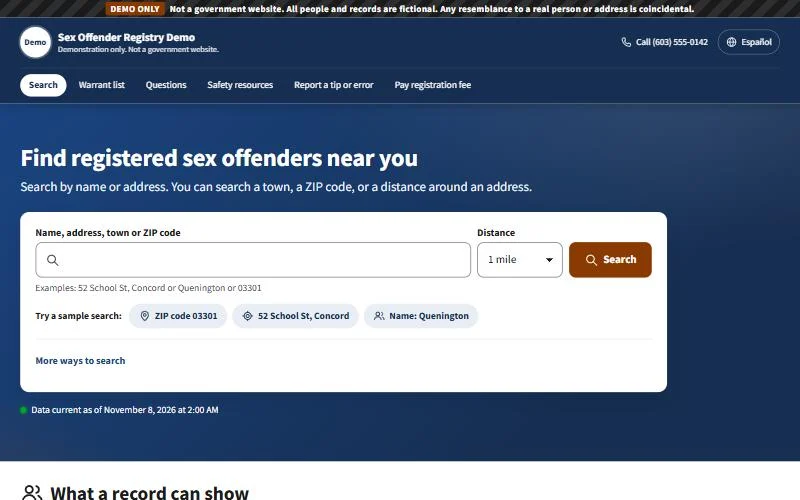
Residents search by name, address, town or ZIP code, on a site that carries your jurisdiction’s name and rules. Staff manage the records behind it in their own application, and other systems connect through a secure API.
The screenshot comes from our demo, where every person and record is fictional.

A tested product, set up to follow your rules.
Your statutes, fields and display rules are settings, not code, so the public gets a site that works and your staff get tools built for the job.
-
Residents
Search by name, address, town or ZIP code, on any device.
-
Staff
Review every record in their own application before it is published.
-
Your other systems
Send and receive data through a secure API, with no double entry.
Three parts, one product.
The public sees the search site. Your staff work in the administration app. Your other systems talk to the API. All three run on the same configuration.
-
A public search site
The site residents use to look up the registry, built for phones as well as desktops and for people who use assistive technology.
-
An administration app for staff
Where your staff add, update and review records before they are published, in an application separate from the public site.
-
A secure data API
A controlled way for your other systems to send and receive registry data, so records are not keyed in twice.
Agencies that answer to the public for every record.
Every jurisdiction has its own statutes, fields and display rules. The Public Registry treats those as settings, so you get a product that has already been built and tested, set up to follow your rules.
- State agencies Departments that maintain a statewide registry and publish it to residents.
- Local government Counties and cities that publish a registry for their own community.
- Agencies replacing an aging system Teams that want a modern public site and staff tools without paying for a one-off build.
Configured, connected, launched.
Every rollout follows the same steps. How long each one takes depends on your rules, your data and your procurement process, and we plan it with you up front.
-
Discover
We walk through your statutes, the records you publish, how staff work today and who needs access.
-
Configure
Your fields, rules, wording and branding are set up in the product, and you review them on a working site.
-
Connect
Your existing records are brought in and your other systems are connected through the API.
-
Launch
Staff are trained on the administration app, the public site goes live, and we stay on for support.
Before you ask.
The questions agencies ask us most about the registry. If yours is not here, ask it on a demo call.

Is this a custom build?
No. The Public Registry is a product. Each jurisdiction is a configuration of it, not a rebuild, which is what keeps a rollout predictable.
Can it follow our state's rules?
That is what the configuration is for. Your statutes, fields, wording and display rules are set up in the product during rollout, and you review them on a working site before launch.
Can it connect to the systems we already use?
That is what the secure data API is for. In discovery we look at the systems your records come from and plan how they connect.
Who owns the data?
Ownership of data and records, and how they are handled, is set in your agreement. We spell it out before work starts.
Can we buy it through an RFP?
Yes. We answer formal requests for proposals from state and local agencies. Send us your RFP.
Can we see it working?
Yes. Book a demo call and we will walk you through the public site and the administration app.
Let's talk.
Tell us what you want to build, fix or grow. In 30 minutes we will tell you how we would approach it and what it would take.